
Dehancer is sold only on dehancer.com. This guide walks you through the checkout step by step and shows where the promo code FILMLOOK10 goes, so you pay 10% less.
Step 1: Choose your plan
Open dehancer.com/pricing. There are three tabs:
- Individual: subscriptions for one person (Mobile, Photo, Video & Photo).
- Business: Studio and Production plans for companies.
- Lifetime: one-time purchase for a single plugin, for example Dehancer Pro for DaVinci Resolve.
If you edit video, the Video & Photo plan is the one that includes the plugins for DaVinci Resolve, Final Cut Pro, Premiere Pro, After Effects and Vegas Pro, plus the photo plugins and apps. Not sure which plan fits? See the Dehancer pricing guide.
Step 2: Pick monthly or yearly billing
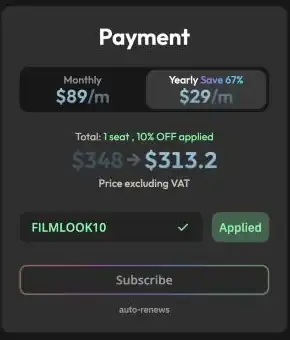
In the checkout you can switch between monthly and yearly billing. For Video & Photo, monthly billing costs $89 per month, yearly billing $29 per month, billed $348 per year. Dehancer labels this as saving 67%.
Step 3: Confirm the legal checkboxes
You have to tick two boxes: that you agree to the Terms of Service and Privacy Policy, and that individual plans may not be used in company business. If you buy for a company, choose a Business plan instead.
Step 4: Enter FILMLOOK10 and click Apply
Below the price there is a Promo Code field. Type FILMLOOK10 and click Apply. The total then shows “10% OFF applied” and the reduced price.
Step 5: Subscribe and pay
Check the total once more, then click Subscribe. Prices on dehancer.com are shown excluding VAT, so the final amount depends on your country. Subscriptions renew automatically.
Before you buy: try it for free
Dehancer offers a free version with a watermark, so you can test it on your own footage first. Details in Does Dehancer have a free trial?
Disclosure: FILMLOOK10 is an affiliate code. If you use it, you get 10% off and this site receives a commission at no extra cost to you. This site is independent and not operated by Dehancer.